Contract From the Reference
Reads the page you are building toward and writes down every value it renders. Nothing has to be approved first, because the reference is the baseline.
Open Source · MIT License · Node 22.12+
Your coding agent cannot see the page it just built.
Install it next to your project, point it at the reference page, and it writes down every value that page renders. Then it measures your implementation against that file and answers with one line per property that drifted. Not a screenshot. Not an opinion. A number your agent can act on.
pixelpact reads the reference, records what it renders, and checks your build against it. One file, no service, no baseline to approve first.
Reads the page you are building toward and writes down every value it renders. Nothing has to be approved first, because the reference is the baseline.
Each deviation carries the expected value, the measured value and the difference between them. The louder opinion stops winning the argument.
Interactive elements are hovered and focused, and only the properties that actually change are stored. Hover and focus stop being the part nobody reviews.
Custom properties on the root element and named animation keyframes travel inside the contract, so a design system moves with the measurement.
When every value passes and the page still looks wrong, compare the screenshots and get a percentage instead of a feeling.
The contract is a file you can read, diff and review in a pull request. No proprietary format, no dashboard, nothing to log into.
A composite Action runs the check against a preview deployment and keeps a single pull request comment up to date instead of adding one per push.
It measures the rendered DOM, so React, Vue, Svelte, Astro and hand written HTML are all the same to it. If a browser can render it, pixelpact can measure it.
A Figma url is read through the REST API with no browser launched, and the contract binds to your markup through data-contract attributes.
From a single value in the reference to a section by section image with the differences boxed, pixelpact handles the whole loop.
Percy, Chromatic, Applitools and BackstopJS compare your page against a baseline you approved earlier. While you are still building toward a design, there is no baseline to compare with.
| Property compared | Visual regression tools | pixelpact |
|---|---|---|
| Compares against | a snapshot you approved earlier | the reference design itself |
| Useful when | the UI is already correct | the UI is being built |
| First run on a new page | records, cannot judge | measures against the reference |
| Answer you get | an image diff to inspect by eye | a value per property, with a delta |
| Fits an autonomous agent | needs a human to approve the diff | the numbers close the loop |
The two models are complementary. Use a regression tool to keep a finished page finished, and pixelpact to get it finished in the first place.
An agent that writes UI code cannot tell whether it succeeded. The MCP server hands it the measurement, so the loop closes without a person in the middle.
pixelpact check  FAILED
  viewport  desktop 1440x900
  elements  14 matched, 0 missing of 14
  checks    1056 passed, 10 failed (99.1%)

deviations (10)
SELECTOR   PROPERTY          EXPECTED   ACTUAL
main > h1  font-size         48px       44px
main > a   box.width         117.75px   109.75px
main > a   padding-left      24px       20px
main > a   background-color  #0b7285    #2563eb
main > a border-radius 8px 4px// .mcp.json
{
"mcpServers": {
"pixelpact": {
"command": "npx",
"args": ["-y", "pixelpact-mcp"]
}
}
}Tools exposed: extract_contract, check_implementation, diff_pixels, read_contract_summary.
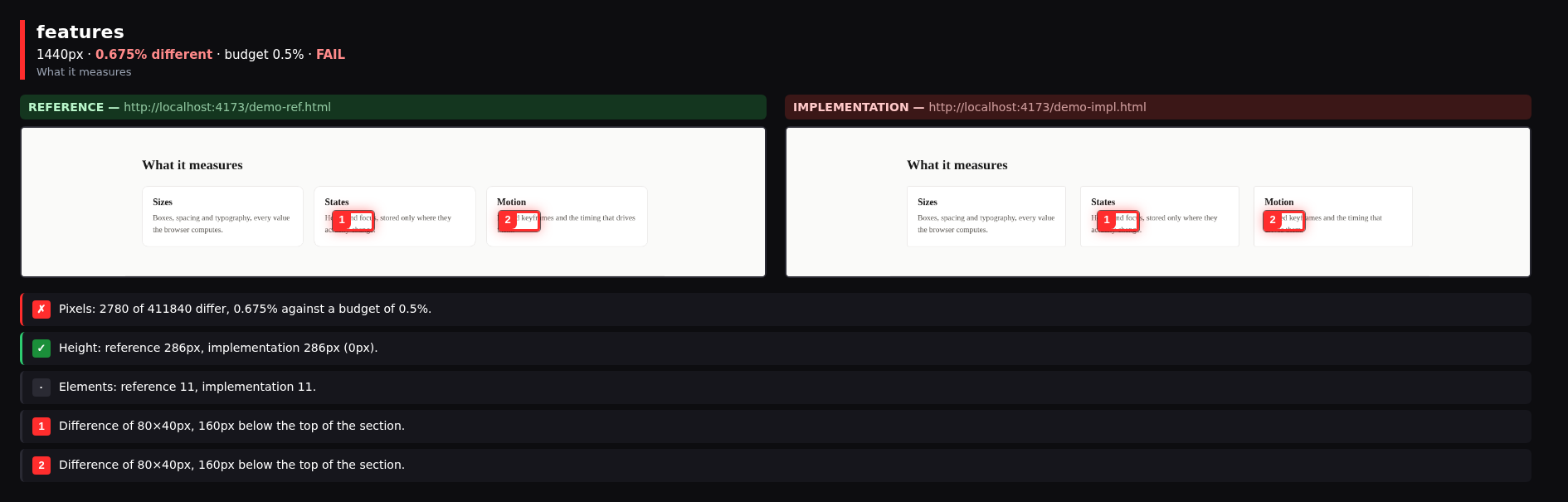
side run. The card gap and the corner radius were changed, and both are boxed.Three commands from an empty project to a measured page. No account, no dashboard, no baseline to approve.
Playwright is a peer dependency, so the browser download stays under your control and a project that already has it installs nothing extra.
pnpm add -D pixelpact playwright
pnpm exec playwright install chromiumPoint it at the page you are building toward. The contract is written to a file you can commit and review.
npx pixelpact extract https://reference.example.com \
--selector "main" --viewport desktop,mobile -o contract.jsonExit code 0 when everything is inside tolerance, 1 when it is not, so it drops straight into a script or a CI job.
npx pixelpact check contract.json http://localhost:3000 --viewport desktopShort answers to what usually comes up before the first run.
Install pixelpact-mcp, point the MCP client at it, and extract the contract once. After that the agent calls check_implementation after every edit and reads the deviation table it gets back, so it can correct itself without a person in the middle.
Those tools compare your page against a snapshot you approved earlier, which assumes the page is already right. pixelpact compares it against the reference, which is what you actually have while you are still building. Use pixelpact to get a page correct, and a regression tool to keep it that way.
No. The reference page is the baseline, and that is the whole idea. There is nothing to approve before the tool becomes useful, so the very first run on a brand new page already produces a verdict.
Element matching tries the data-contract attribute first, then the css selector, then the tag and its text. Put data-contract="hero-cta" on your element and matching stops depending on how the reference happened to nest its divs.
Mask it. --mask ".carousel" keeps a region out of the pixel comparison, and --max-elements stops a long page from producing a contract nobody can read.
It means every value in the contract matched inside tolerance. Elements that exist in your page but not in the reference are not flagged, because the contract only describes what the reference contains. Run diff as well when nothing extra is allowed.
Install it, extract one contract, and let your agent read its own deviations. Everything described here is built and every number came from a real run.